Drawing a Regular Polygon
In this Task
- A regular (square) sided polygon will be drawn from its center onto the quadrant of a circle.
- The segment of circle drawn through the polygon will be trimmed.
Associated Tasks
- Single Line Polygon
- Trim
- Using a Pick Window to select objects.
Take Note
- This drawing has multiple concentric circles. Zoom into the area where the polygon will be inserted.
- When selecting objects using a right-to-left direction, all objects contained within or intersected by the selection window will be selected.
Polygon from Center

Draw | Polygon | Rectangle Polygon (option Center Point Polygon)
This tool draws a rectangle shape by defining the center, the width and height.
The polygon can either be constructed of single lines or as a Smart PolygonA Smart Polygon is a single unit with a width and height value. The interior region of the polygon can be filled by setting the Show Fill option in the Inspector..
In this task, a regular sided polygon will be drawn on the quadrant of the circle, shown below.
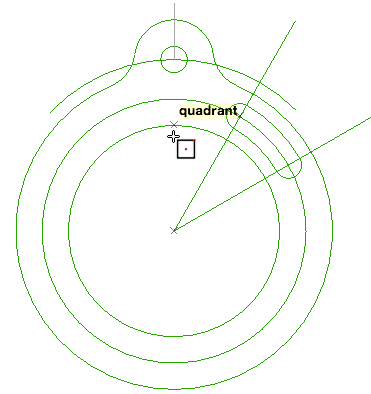
Finding the quadrant for the polygon
Select the Center Point Polygon tool or use Draw > Polygon > Rectangle Polygon. Select Center Point Polygon from the options menu at the top left of the screen.
From the Edit bar, select Single Line.
Left click onto the quadrant point shown below, then TAB to the Width and Height fields and input a value of 12 for both.
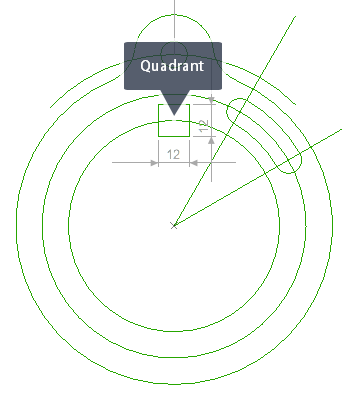
Creating the Polygon to 12 x 12
Trim

Modify | Trim | Trim
The Trim tool trims lines, arcs of circles to a defined boundary edge.
The keyboard SHIFT key is used to select multiple objects and can be used to add or remove objects to the selection.
Select the Trim tool, then create a pick window around the polygon, using a right-to-left directionA right-to-left selection rectangle selects all objects full contained within the rectangle as well as objects which are intersected by the selection rectangle. selection rectangle, shown below.
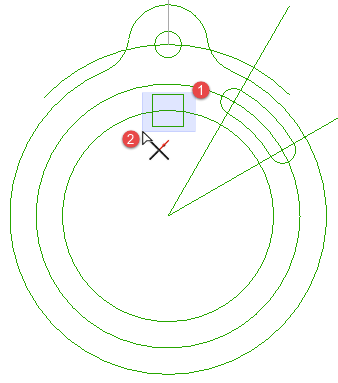
Using a right-to-left pick window
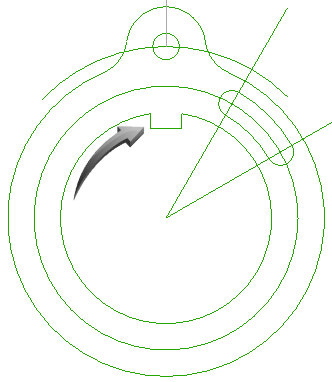
Select the segments to remove so that the result is the same as the illustration below. Please note the top horizontal segment should be selected, then deleted.