Creating a Polar Duplicate
In this Task
- A radial pattern will be created to form an equidistantly spaced array.
Associated Tasks
- Center Point Circle.
Before you Start
- Zoom into the center of the drawing, using the center of the concentric circles as the center of the zoom.
Take Note
- Accurate placement of the center point of the array is critical. Use the CENTER snap.
Center Point Circle

Draw > Circle > Center Point Circle
This circle tool draws a single circle by defining the center point and diameter.
The diameter can either be defined by selecting a point in the graphics editor, or by inputting a value into the Diameter field.
The diameter of the circle can be changed after insertion by changing the value in the Diameter edit field.
Insert a circle with a diameter of 6 on the intersection of the inner circle and the horizontal center line, shown below.
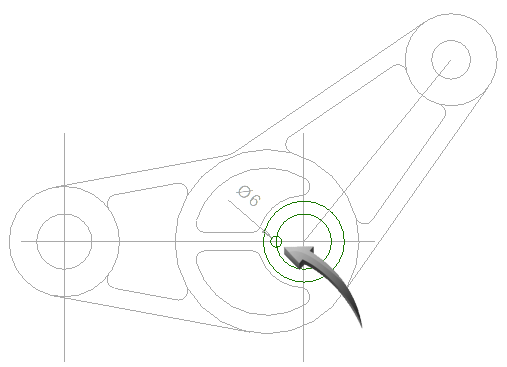
Circle with a diameter of 6 inserted onto intersection of inner circle and center line
Polar Duplicate

Modify | Transform | Polar Duplicate
This duplication tool creates copies of an object or objects in a circular pattern around a common center point.
Zoom into the area of the newly inserted circle.
Select the Polar Duplicate tool from the toolbar or use Modify > Transform > Polar Duplicate.
Select the newly drawn small circle. The Polar Duplicate dialog box will appear.
Input 7 into the Number field. Make sure the total angle is set to 360.
Click into the Center X field, then use the cursor to indicate the center of the circle, shown by the arrow in the illustration below.
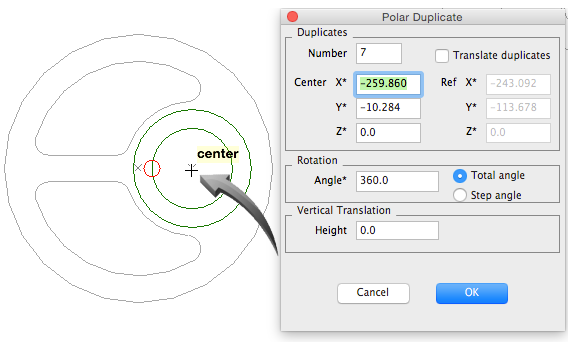
Defining the center of the Array
Click OK. The result is shown below.
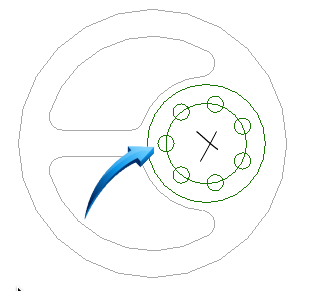
7 equi-spaced circles with a diameter of 6 created as a polar duplicate
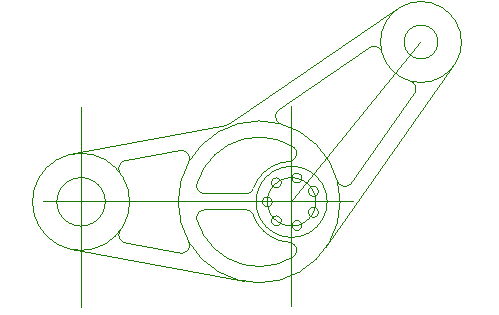
The drawing, at this stage of the session, should resemble the illustration below.